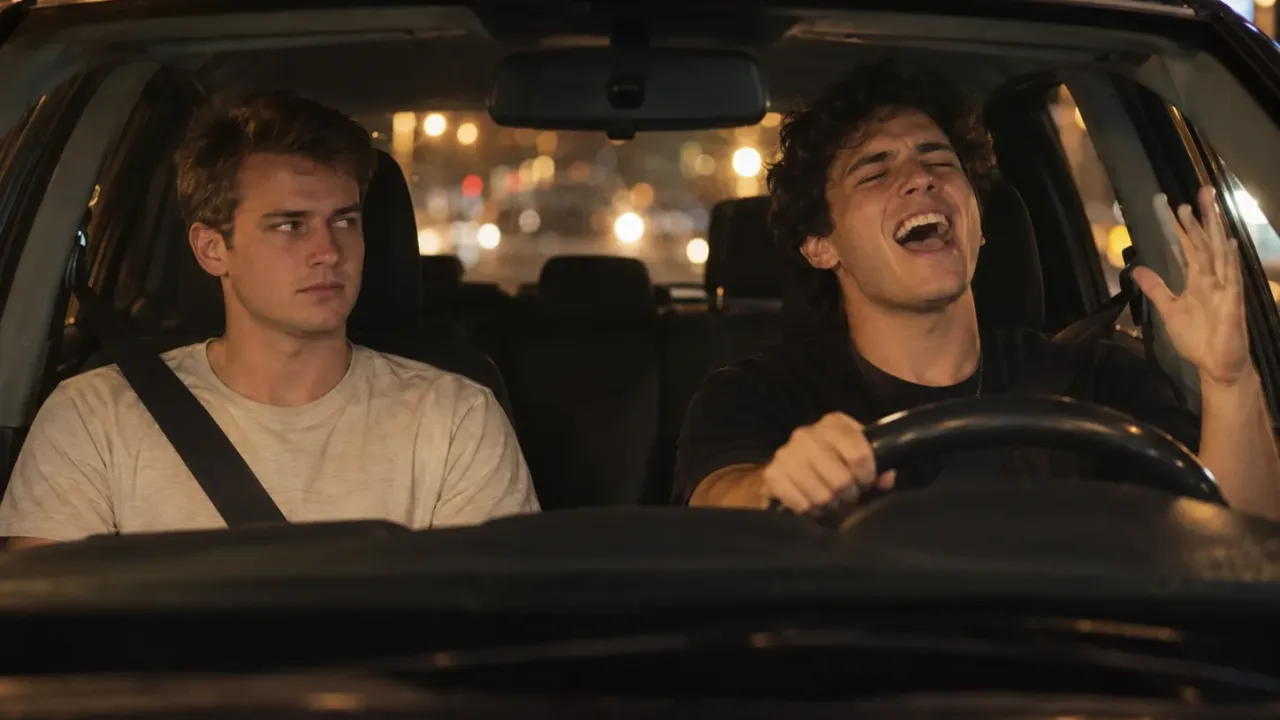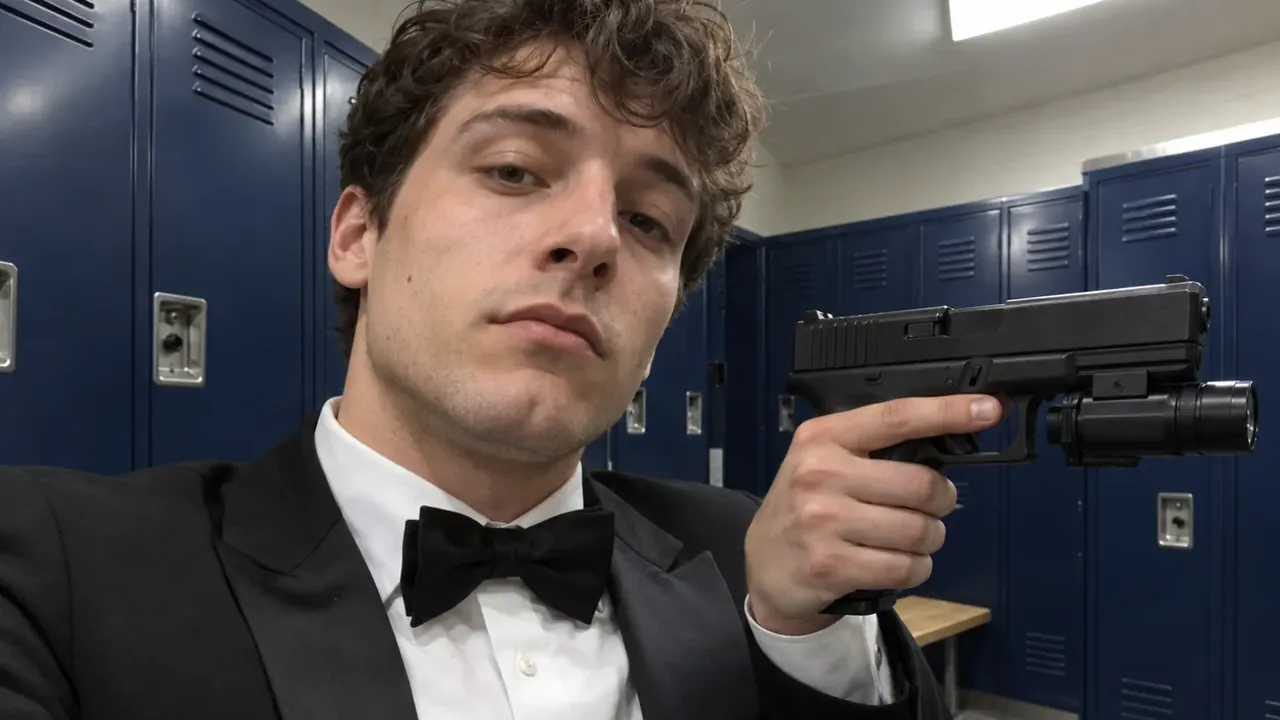
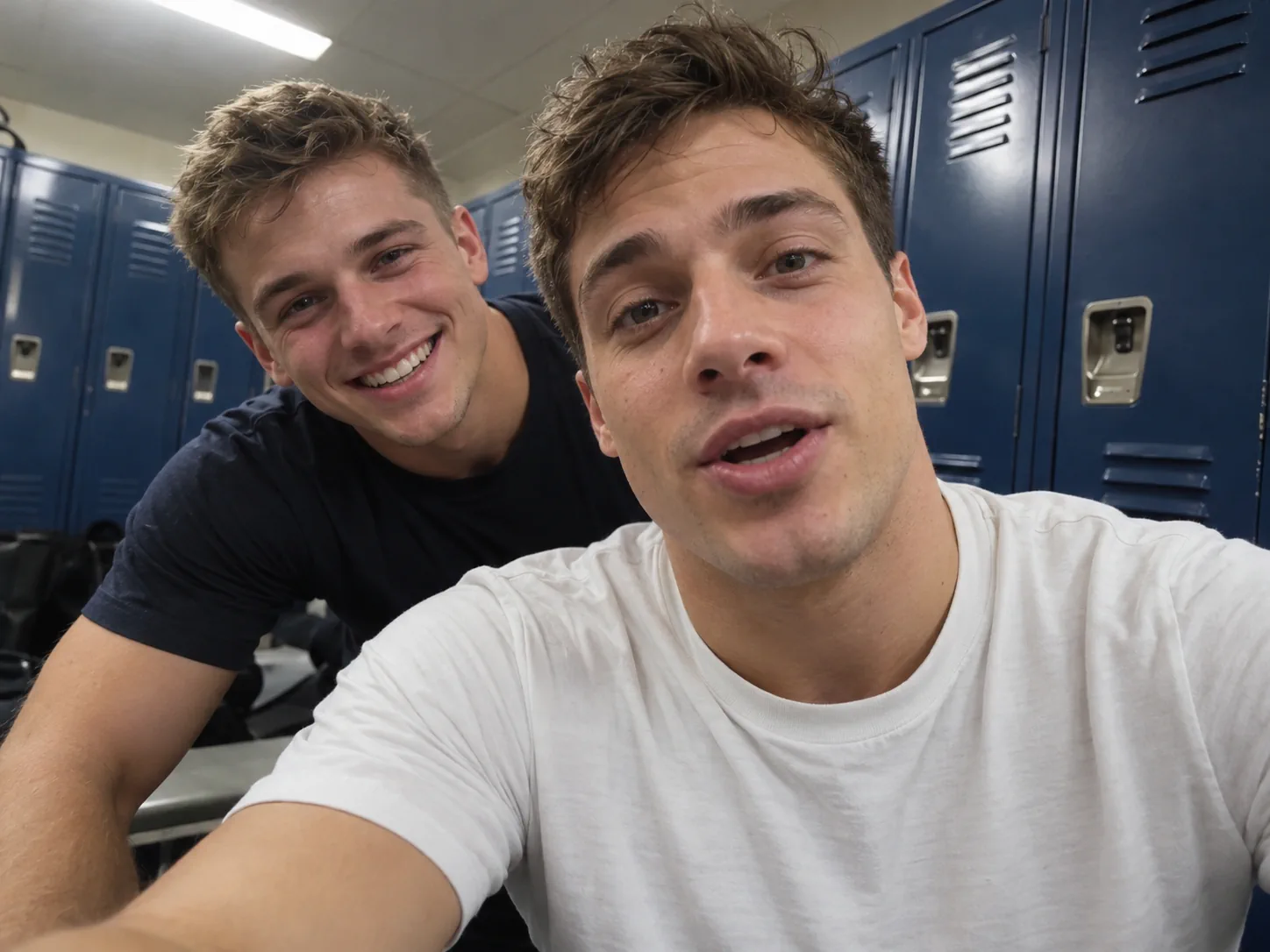
To make an End of Watch AI video, you put your own face into the locker room scene from the 2012 cop film End of Watch: you film yourself up close, then hold each piece of gear up to the lens while your partner leans into the shot. The quickest route is a template with the scene, props and sound built in: one photo gets you the solo cut, two get you the duo. The slower way is a general video model and a lot of retries.
Here is what we learned building this scene into our End of Watch AI generator: an End of Watch AI video is a prop show, not a dance. Every beat is an object pushed toward a wide-angle lens a few inches away. That is exactly where AI video struggles. The props bend, the hands melt, and the lens stretches your face. Pick the method that keeps those things solid, and the rest is easy.
Our Duo sample: two still photos in, this clip out.
How to make an End of Watch AI video: 4 steps
- Pick a scene. Solo is one person doing the whole gear check. Duo is the film's two-person version, with a partner who leans in.
- Add your photos. Solo needs one. Duo needs two, one per person, and it won't run with only one.
- Set the quality. Run a cheap 480p test first, then make the sharper 720p or 1080p copy you post.
- Generate, download and post. The clip comes with the trend's sound already on it.
Below: where the scene comes from, what happens in each second, which scene to pick, two other ways to make it, and how to fix common mistakes.
Where the End of Watch locker room scene comes from
End of Watch is a 2012 police drama written and directed by David Ayer. Jake Gyllenhaal plays Officer Brian Taylor and Michael Peña plays his partner, Mike Zavala. In the story, Taylor films his shifts for a film class he is taking, as the Wikipedia summary of the film explains. That is why so much of the movie looks like home video.
The scene everyone copies comes right after the opening car chase. In the locker room, Taylor turns a small camera on himself and says, "This is where the forces of good prepare to fight the forces of evil." Then he shows off his kit, item by item: sidearm, knife, handcuffs, spare magazines. Zavala pokes fun at him the whole time.
It was a small film. Box Office Mojo lists a budget of $7 million, a US release on September 21, 2012, and about $55 million earned worldwide. But the locker room clip took on a second life online. People started filming their own "gear check" with whatever their job or hobby uses, and the End of Watch AI video is the newest form of that joke: the real scene, with your face in it.
The scene beat by beat: what your End of Watch AI video has to copy
This is the part to know before you make an End of Watch AI video, whatever tool you use. The scene is short, and each beat is one object shown to the lens. We timed both versions in our template:
| Time | Duo (the film's scene) | Solo (one-person version) |
|---|---|---|
| 0–1 s | The officer talks right into the lens; the wide angle curves the lockers behind him | He starts with the pistol up next to his cheek, light aimed just off the lens |
| 1–3 s | The partner pops in on the left with a big grin | The gun light flashes at the camera and the picture goes white |
| 3–5 s | The pistol, shown side-on, then held across the chest | A little black canister, then the cuffs, held up with two hands |
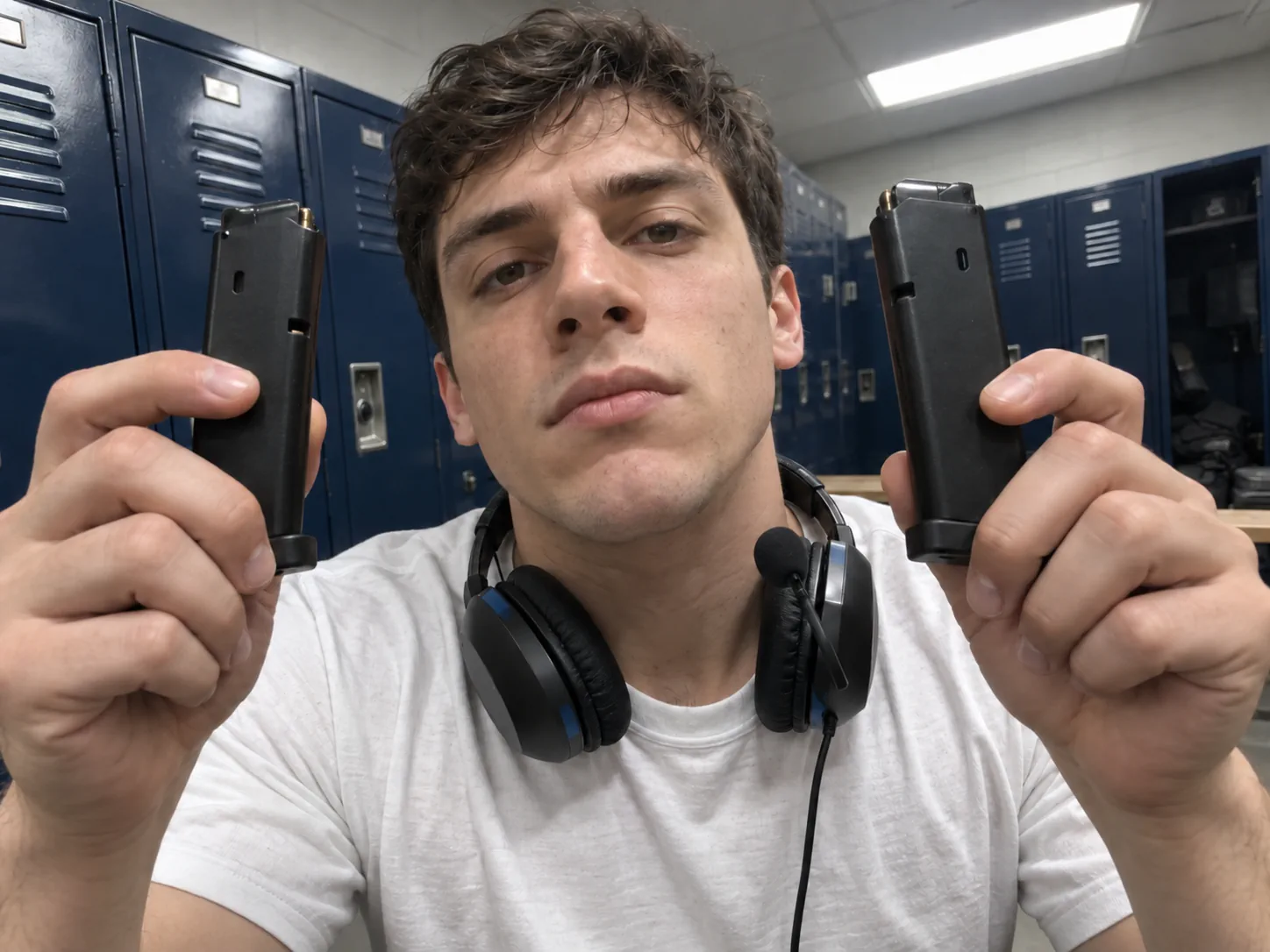
| 5–7 s | A knife pushed toward the camera, then the handcuffs raised like a trophy | The first spare magazine, held beside the cheek |
| 7–9 s | Two magazines, raised one after the other, one per hand | The same two-magazine beat |
| 9–11 s | He ends on a deadpan look at the camera | Back to the pistol, one more sweep of the light, a last word to the camera |
Two things stand out:
- The camera is almost touching the face. A wide lens that close stretches noses, foreheads and anything held toward it. Your photo has to give the AI enough detail to rebuild your face under that stretch.
- The props never stop moving. A gun, a knife, cuffs and two magazines all pass through the frame in about ten seconds. If a tool rebuilds the props from a text prompt, each one is a new chance to bend or melt.
Solo or Duo: which End of Watch AI template to pick
Our End of Watch AI template has two scenes. They are not two lengths of the same clip. They are two different shoots of the same idea.
| Duo | Solo | |
|---|---|---|
| What it is | The film's own locker room scene | A creator's one-person remake of it |
| Photos | 2, both required (officer + partner) | 1 (you) |
| Length and shape | About 10 seconds, 16:9 (wide) | About 11 seconds, 4:3 |
| Your outfit | Plain white tee | Black tux with a bow tie |
| Best moment | The partner leaning in at about one second | The torch flash into the lens |
| Pick it when | You have a friend, partner or coworker to cast | You are making it alone |
A few tips:
- Duo needs two people. It recasts both the officer and the partner, so you can't leave one of them as filmed. Got just one person? Use Solo.
- The clothes come from the scene, not your photo. Your shirt in the photo doesn't matter: Duo puts you in a white tee and Solo in a tux. What the photo does decide is your face, hair, skin tone and build.
- Price is the same for both scenes. So pick on the joke, not the cost.
Pick the right photos for your End of Watch AI video
Most of the result comes down to the photos you upload. Because the lens sits so close to the face, small problems in the photo get bigger on screen.
- One person per photo. For Duo, upload two separate pictures, not a shared selfie.
- Face toward the camera, in soft, even light. Daylight by a window is ideal. Side-on and dim photos run out of detail in the close-up.
- Chest-up is plenty. The lens never pulls back, so a full-body shot just shrinks your face.
- Show your hairline. The officer in the original scene has a shaved head, and that never carries over. A cap or a hood in your photo hides the very thing the model needs to keep your hair.
- No sunglasses, masks or heavy beauty filters. They hide the parts of the face the close-up shows most.
- Grown-ups only, with their OK. The props include a gun and a knife, so leave kids out. Ask before you use a friend's or coworker's photo.
Method 1: Make an End of Watch AI video from photos (fastest)
Most people make an End of Watch AI video with a template. Everything except the faces is done for you. No movie download, no clip cutting, no prompt.
In our End of Watch AI video generator:
- Choose Duo or Solo first.
- Fill the photo cards. On Duo, you go in the officer slot and your partner goes in the other. If a photo is missing, the form tells you before anything is charged.
- Pick the quality. Prices are fixed and match across both scenes: 400 credits for 480p, 600 for 720p and 900 for 1080p, and you see that figure on the button before you start.
- Generate. It renders on our side in roughly 5–10 minutes; leaving the page is fine. A failed render refunds its credits.
- Download from My Creations. You get an MP4 with the sound already underneath and no watermark.
An account costs nothing. If you just want one go, the Trial Pack on the pricing page pays for a single 720p clip.
Under the hood, the model copies the props, moves, camera and timing from the real clip. It only swaps who is in it. That is why the gun, the cuffs and the magazines hold their shape: they come from the footage, not from a text description.
Method 2: Build an End of Watch AI video with Kling or Seedance
Want another room, another outfit or a longer cut? Then you can build the End of Watch AI video on a general model. Expect more setup and more retries.
With Kling Motion Control
Kling's Motion Control takes the moves from a clip and puts them on your photo.
- Get a reference clip you are allowed to use, trimmed to the locker room beats.
- Match the framing. Kling's Motion Control guide asks you to match half-body to half-body. For this scene, that means a chest-up photo.
- Bind a face element for your identity, and generate a few takes.
The catch is the Duo version. Kling's guide says it binds one face element per video. With more than one person in the opening frame, it goes for the biggest one, and when two people are about the same size it can end up choosing nobody. It also recommends a one-person motion reference. So Kling suits the Solo scene well, but a Duo End of Watch AI video usually means rendering each person on their own and joining them in an editor.
With Seedance
Seedance takes several references at once. ByteDance's Seedance 2.0 launch post says a single request takes as many as 9 images, 3 videos and 3 audio clips, each given a role with a tag like @Image 1. A starting prompt:
Handheld selfie shot with a wide-angle lens, very close to the face, 16:9.
A police locker room with a wall of blue metal lockers. The man from
@Image 1 wears a plain white crew-neck T-shirt and talks to the lens.
At one second, the man from @Image 2 leans in from the left and grins
over his shoulder. The first man then holds up, one at a time: a black
pistol with a mounted light, a knife, a pair of handcuffs, and two
spare magazines, one in each hand. Copy the motion and pacing of
@Video 1. Keep both faces and hairstyles exactly as in the photos.
Props stay solid and keep their shape. No cuts.
You can try a prompt like this with Seedance 2.5. Be ready to throw away takes. Hands gripping small objects close to a wide lens are one of the hardest things for video models to keep steady. Ask for "props stay solid", keep the camera move simple, and generate three or four versions.
Method 3: Film it yourself (no AI)
Before the AI version, the trend was people filming their own gear check. It still works, and it costs nothing.
- Switch your phone to the ultra-wide lens (0.5x on most phones) and hold it at arm's length, close to your face. That close, wide look is the whole style.
- Find a row of lockers, or any plain wall at work.
- Lay out four or five items in the order you'll show them.
- Show one item every two seconds or so, right up to the lens, keeping a poker face.
- Add a friend who leans in over your shoulder around the one-second mark.
Use your real work gear, not weapons: a barista's tamper and milk jug, a nurse's stethoscope and badge, a chef's knife roll, a gamer's headset and controller. Never film with a real firearm, and don't point anything that looks like one at anyone. The joke is the serious face, not the gear.
Which way to make an End of Watch AI video
| Photos in a template | Kling Motion Control | A Seedance prompt | Film it yourself | |
|---|---|---|---|---|
| You need | 1 or 2 photos | Photo + reference clip | Photos + clip + prompt | A phone and props |
| Prompt to write | No | A short one | A long one | No |
| Props hold their shape | Yes, from the real clip | Mostly | Takes retries | Yes, they're real |
| Duo with a partner | Built in | Hard (one face per video) | Possible, takes retries | Yes |
| Your face in the film's scene | Yes | Yes | Yes | No, your own room |
| Best for | Posting today | Solo, exact motion | Custom sets and outfits | A work or hobby version |
Our take: for the classic End of Watch AI video with your face in the real locker room, start with photos. Use Kling or Seedance when you want something the template doesn't do, such as a different room or outfit. Film it yourself when your own job is the joke.
What song is in the End of Watch meme?
There isn't one official song. Our template keeps the audio each scene was shot with, so there is nothing to find or line up.
If you're making your own edit, many End of Watch locker meme posts are cut to a drill beat. One sound that comes up again and again is "Twirlanta" by 22Gz, from his 2021 album The Blixky Tape 2. Sounds rotate fast, though. The surest way to match a post you like:
- Open that post on TikTok and tap the spinning sound icon in the bottom corner.
- Tap Use this sound, then upload your End of Watch AI video.
- Turn your clip's own volume down to zero so the two tracks don't clash.
End of Watch AI video ideas that work
The locker room format fits anyone with a ritual before they start.
- A loadout check for gamers. Hold up each item before a ranked match. The props fit CS2 or any other shooter just as they are, so put the game and your squad tag in the caption.
- You and your best friend. Duo, with the friend who always photobombs as the partner.
- Coworkers before a shift. Nurses, cooks, guards and night crews each have a pre-shift kit check. Post yours before clocking in.
- Film fans. Quote Taylor's "forces of good" line in the caption and play the scene straight.
Fixing a bad End of Watch AI video
Why is my face stretched out?
The wide lens sits very close, so some stretch is part of the look. If it no longer looks like you, the photo is usually too small, soft or side-on. Swap in a crisp, straight-on photo with your face large in the frame.
Why did the gun, knife or cuffs melt?
That happens when a model draws the props from a text prompt. Copying them from real footage keeps them solid. With Seedance or Veo, keep the camera move simple, say "props keep their shape" in the prompt, and generate several takes.
Why did my hair disappear?
The officer in the film has a shaved head, and some models copy it. Use a photo where your hairline shows clearly, with no cap or hood. In a prompt, say "keep the hairstyle exactly as in the photo".
Why did my clothes change?
In the template that is on purpose: the scene sets the outfit. With your own prompt, describe the outfit you want and list it under what must stay the same.
Why did the two of us swap places in a Duo?
The model mixed up who is the officer and who is the partner. Use two separate photos, never one shot of you both, and keep them in the right order: the officer first, the partner second.
Why does it look blurry?
480p is for testing. Make the final copy at 720p or 1080p, and start from a sharp photo, since a blurry face can't be sharpened into a clear one.
How do I post it to a vertical feed?
Duo is wide (16:9) and Solo is 4:3. Place the clip on a tall 9:16 background in CapCut or in TikTok's editor, and put your caption in the empty space above or below.
Before you post: weapons, labels and consent
In a template End of Watch AI video, the pistol and everything else are generated; no real weapon is involved. Even so, apps may flag gun imagery. Turn on the AI label, which the TikTok Help Center wants on realistic AI content, and read the latest rules before you post. Stick to adults who said yes, and leave the actors' real faces out.
Make your End of Watch AI video
In short: an End of Watch AI video is a gear check shown to a wide lens, so keep the props solid and give the model a clear face with your hairline showing. Use Solo when it's just you, and Duo when you have a partner to lean in. Test at 480p, then post the sharper copy.
The quickest route is our End of Watch AI generator: one or two photos, no prompt, sound included. Want another film scene to do with a friend? Read how to make a White Chicks AI video, or see the full list of AI video effects we offer.
Sources
- End of Watch, Wikipedia
- End of Watch, Box Office Mojo
- Motion Control User Guide, Kling AI
- Seedance 2.0 official launch, ByteDance Seed
- AI-generated content, TikTok Help Center