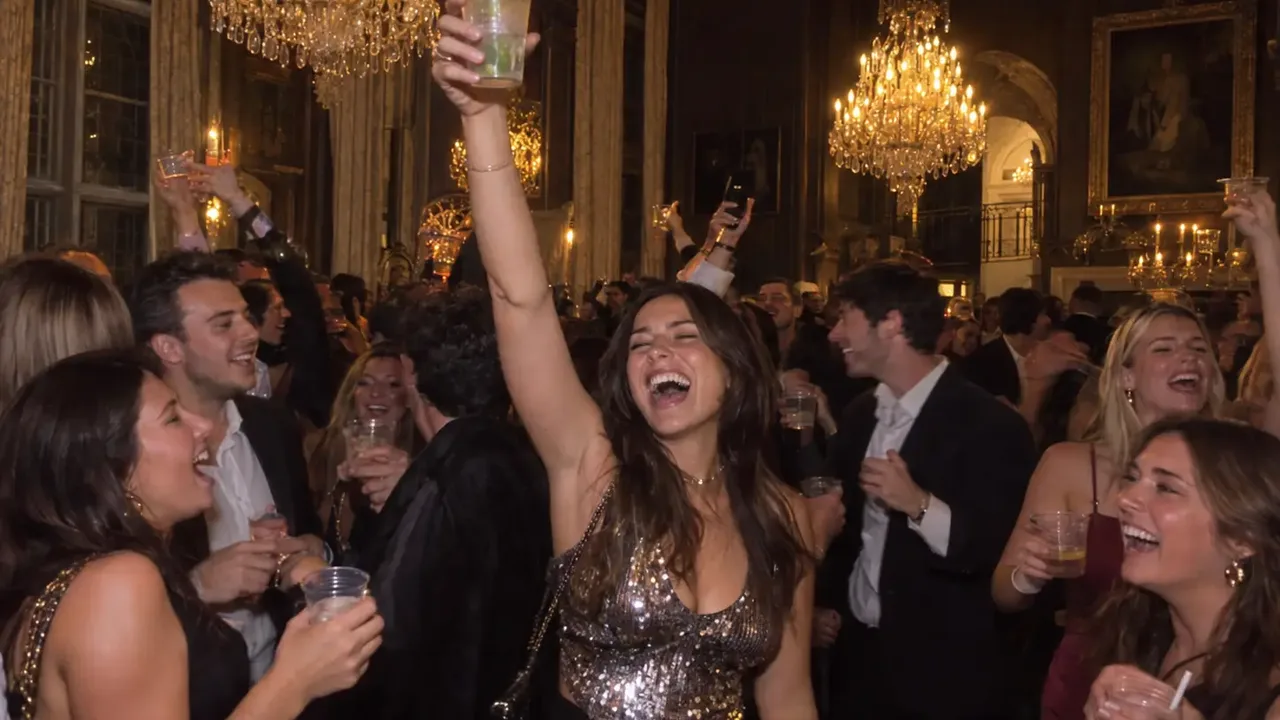
To do the Drake Burning Bridges trend, you become the loudest guest at a packed party under crystal chandeliers: cup raised, pointing at the crowd, waving at the lens, with Drake's "Burning Bridges" playing over it. That guest can be you, a friend or even your dog. The fastest way is one photo and an AI template. You can also film the "Where she at?" gesture yourself, or recreate the music video with yourself in it using a general AI video tool.
Here's the thing most guides miss: the Burning Bridges trend is really two trends that share one song. One is a gesture anyone can film on their phone. The other is the AI party scene, where you take Drake's place in the video. Pick the one you're making first, and the rest of the steps fall into place.
We built a Drake Burning Bridges AI video generator for this trend. To do that, we took the 20-second party scene apart beat by beat, and that breakdown is in this guide too.
A Drake Burning Bridges AI video made from one photo.
How to do the Drake Burning Bridges trend: 4 steps
- Pick one clear photo. A single subject looking at the lens in good daylight, framed from the waist up if possible.
- Turn it into the party scene. Drop it into the Burning Bridges AI generator, choose a resolution and hit Generate. You'll see the price in credits before anything is charged.
- Download the MP4. You get a 20-second vertical clip with Drake's track already underneath and no watermark.
- Share it on TikTok, Reels or Shorts. On TikTok, attach the official sound too, so the video shows up alongside everyone else's.
The rest of this guide covers each way to do the Drake Burning Bridges trend in detail, plus how to fix the problems people run into.
First, which Burning Bridges trend are you making?
"Burning Bridges" is track eight on Drake's album Iceman, released on May 15, 2026. Two different trends came out of it.
The "Where she at?" gesture. On the song's "Where she at?" line, you hold one hand flat above your eyes, like you're shading them from the sun, and scan the room as if you're looking for someone. Drake did it on the stadium screen at the World Cup in Toronto on July 2, 2026, after Cristiano Ronaldo scored for Portugal against Croatia. Four days later, Ronaldo did the gesture back before Portugal played Spain. This version of the Burning Bridges trend needs no AI at all.
The chandelier party. The second half of the official music video is a handheld party: warm light, crystal chandeliers, friends crowding the lens, cups raised. It was filmed in the private dining room of Sotto Sotto, a Toronto restaurant. In the Burning Bridges AI trend, people put themselves, their friends, their pets or cartoon characters in Drake's place in that room.
Most of what people search for, including "Drake Burning Bridges AI video" and "put myself in the Drake video", is the second one. That's where we start.
The Burning Bridges party scene, beat by beat
When we built our template, we mapped every move in the 20-second clip that the AI version copies. If you know what happens when, you know what kind of photo to pick and what to check in the result:
| Time | What happens |
|---|---|
| 0:00–0:02 | Wide shot in the crowd. You stand in the middle, cup in one hand, pointing out into the party with the other. |
| 0:02–0:05 | Close to the lens. A hand thrown up and waved at the camera, then the cup raised beside your head. |
| 0:05–0:10 | Medium shot facing the camera. Cup at the waist, then both arms crossed over the chest, swaying to the beat. |
| 0:10–0:15 | Three-quarter angle. One arm stretched out, pointing the cup at the guests dancing on the right. |
| 0:15–0:16 | A hand gesture right up at the lens. |
| 0:16–0:20 | Medium shot. Both hands come up to the face with the cup, then go up as the crowd cheers. |
Two things stand out. First, you face the camera for most of the clip, often close up, so the face in your photo matters more than anything else. Second, the shot never goes much below the waist, so a full-body photo is nice to have but not necessary.
Method 1: Make the Burning Bridges AI video from one photo
Most people pick this route for the Drake Burning Bridges trend. Everything except your face is prepared in advance: the room, the choreography, the handheld cuts and the music. There's no clip to download, nothing to trim and no prompt to write.
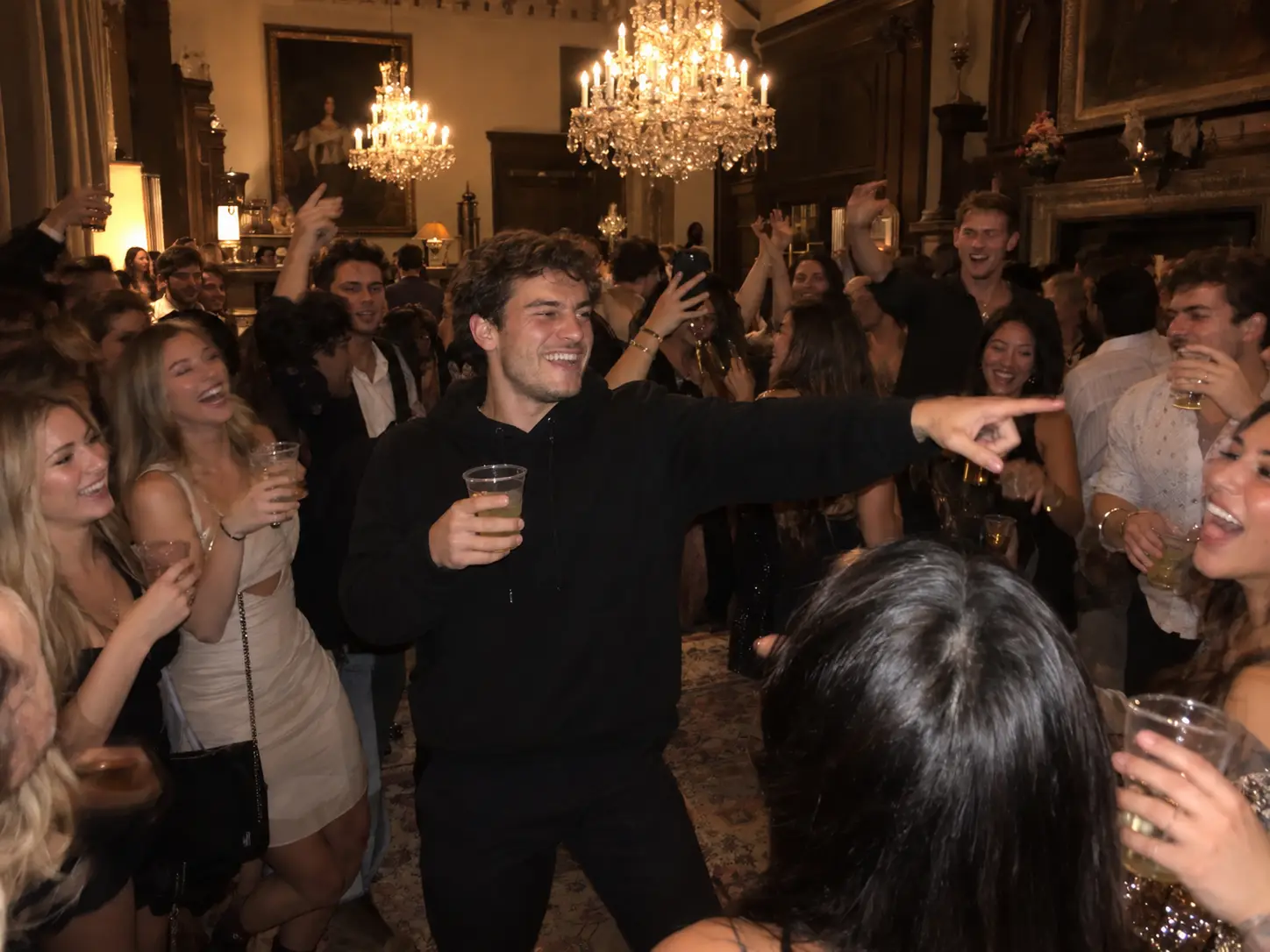
Here's how it works in our Drake Burning Bridges AI video generator:
- Upload one photo. Follow the checklist below.
- Pick a resolution. You don't choose a model, a length or an aspect ratio here; those are locked to match the trend. Start a new photo at 480p, which costs the least, and only spend on 720p or 1080p once you like what you see.
- Generate. Two things happen in order. First it builds a still frame of you at the party, cup in hand. Then Seedance 2.5 brings that frame to life with the moves from the original clip, and the track goes on top. It usually takes 5 to 7 minutes, and you can leave the page in the meantime.
- Download and post. The finished video is saved in My Creations.
The original party crowd and people from the video never appear. The template copies only the movement and the camera, and builds a fresh room and guests around you, while your face, hairstyle and outfit come from your photo.
Photo checklist for the Burning Bridges trend
- Face the camera. Front-on or a slight turn. A side profile hides half the features the model needs.
- Nothing over the face. Keep sunglasses, masks, caps and hands out of the way.
- Bright, even light. Daylight beats a dark bar photo.
- Waist up. This matches how most of the scene is framed.
- One subject. Crop group photos down to one person first.
- No heavy filters. Beauty filters and stylized edits make your face harder to keep.
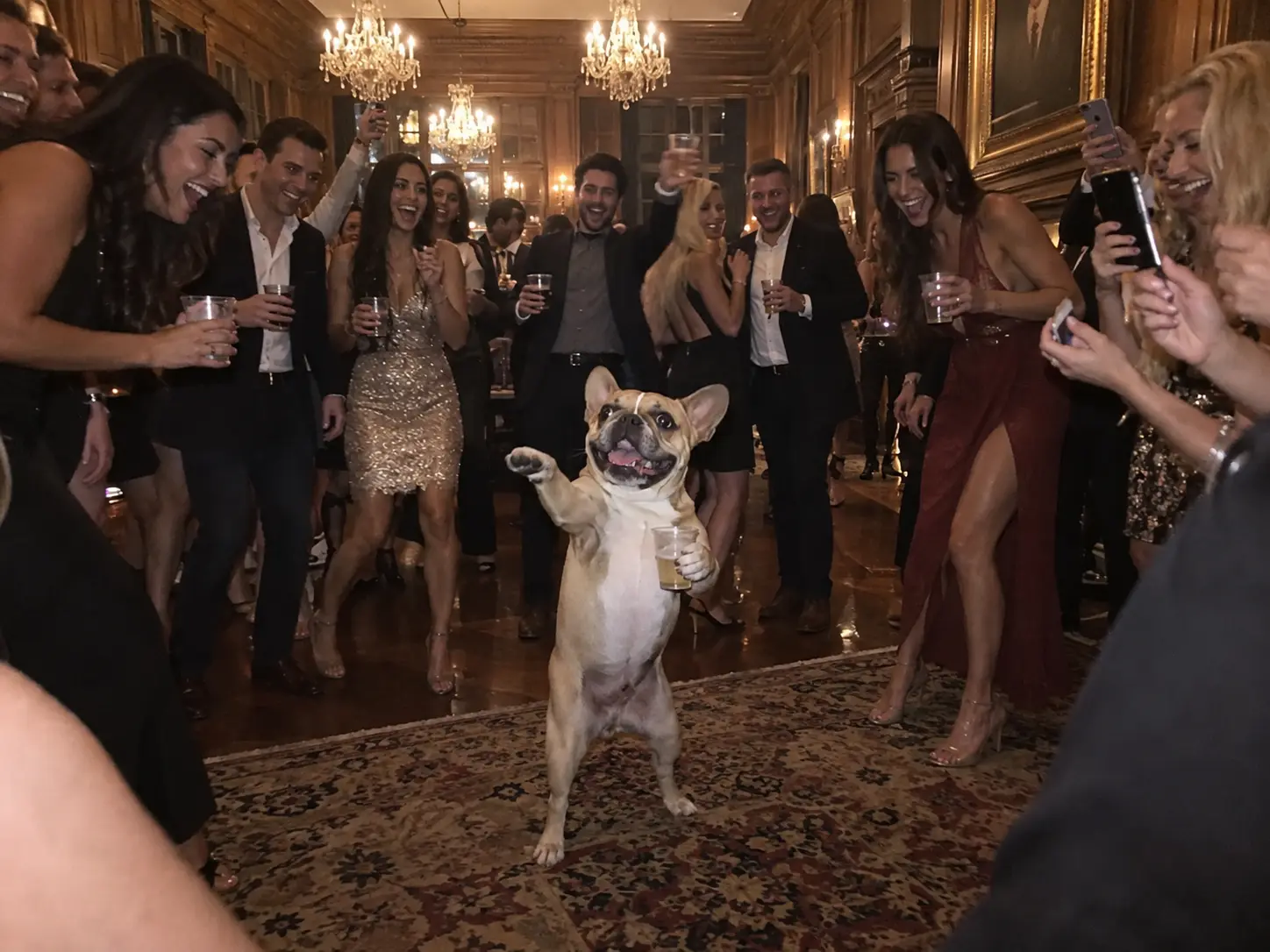
Can your dog or cat do the Drake Burning Bridges trend?
Yes, and it's one of the funniest versions. Picture a French bulldog on its hind legs, cup in a paw, directing the whole room while the guests cheer. It still looks exactly like your dog, down to the coat and the markings. Pick a shot where the pet is alone in the frame; if a person is holding it, the person is left out of the video.
Method 2: Film the "Where she at?" gesture yourself
If you'd rather do the gesture version of the Burning Bridges trend with no AI, all you need is a phone and the song:
- Find the sound first. In TikTok, tap +, then Add sound, and search "Burning Bridges". Pick the version with Drake's name and the official cover art.
- Set up the shot. A party, a group of friends or even your living room. A cup in hand nods to the video.
- Act natural before the line. Dance, talk or hold eye contact with the camera.
- Hit the gesture on "Where she at?". Raise one hand flat above your eyes and slowly turn your head from side to side, as if you're scanning the crowd.
- End on a reaction. A shrug, a laugh, or the cup going up.
Timing is everything in this version of the Drake Burning Bridges trend. Record a few takes with the song playing so the gesture lands exactly on the line.
Method 3: Recreate the music video with a reference-to-video model
If you want the video itself, with Drake's actual room, camera and friends, you need a reference-to-video tool: it takes the original clip as the reference for the moves and the camera, and renders it again with you in Drake's spot. This takes more setup and you'll usually need several takes.
According to Top5Apps' breakdown of the trend, every documented version they found, including the viral Shrek one, was made with Higgsfield's Genjutsu mode. The party section runs from about 1:28 to the end of the official video, and the wave most versions keep is around 2:58. The general workflow looks like this, in Genjutsu or a reference-to-video model like Seedance:
- Trim the source. Cut a short clip from the party section, with the wave and the cup raise. Only use footage you're allowed to use.
- Prepare your reference. One or more clear images of you or your character: front, three-quarter and full body if you have them.
- Tell the model what to keep. Only the man in the centre changes; everything else stays as it is. A prompt like this works as a starting point:
The person in @Image1 takes the place of the man in the black durag
waving at the camera in @Video1, matching his pose, wave, cup and
position exactly. Keep everything else from @Video1 unchanged: the dining room,
the chandeliers, the warm light, the other people, the handheld camera
movement and the cuts. Keep the face, hair and clothes from @Image1.
- Generate three to five takes and keep the cleanest one.
A note on Kling Motion Control: it follows a single performer. When several people are in the frame, the movement comes from the person who takes up the most space. That's fine for a solo version, but don't count on it for two people.
CapCut is the other mobile option. Search the templates tab for "Burning bridges". Templates come and go by region and app version, though, and most of them only edit a clip you already have. They won't generate the party for you.
Which Burning Bridges trend method should you use?
| One-photo template | Film it yourself | Recreate the video with AI | |
|---|---|---|---|
| What you need | One photo | A phone and the song | The source clip, reference images, a prompt |
| Trend version | Chandelier party | "Where she at?" gesture | Chandelier party, original room |
| Prompt writing | None | None | Detailed |
| Works with pets | Yes | Only if your pet cooperates | Hit or miss |
| Takes per good result | Usually one | A few to nail the timing | Three to five |
| Best for | Posting today | Live-action and group videos | Exact original look, characters |
Our take: if the goal is a Drake Burning Bridges trend post starring you, a friend or your dog running the party, start with one photo. Use the reference-video route only when you need Drake's real room, or a cartoon character in it.
How to add the Burning Bridges sound on TikTok and Reels
Your Burning Bridges trend post only lands on the trend's sound page if you use the official sound from the app's library, not a copy baked into the video.
- Upload your clip in TikTok, then tap Add sound (TikTok's sound guide covers the menus).
- Search "Burning Bridges" and pick the track credited to Drake.
- Lower your clip's original volume to zero if it already has the song, so the two don't echo.
- Drag the start so the beat lines up with your first move.
On Instagram Reels, pick the song from the Reels music search the same way. Personal accounts can use it; business accounts often have a smaller music library and may not find it.
Fixing your Burning Bridges trend video
Why doesn't the face look like me?
In the Burning Bridges trend, the cause is almost always the input. If your face is tiny, out of focus or half hidden, the model has to guess what you look like. Pick a sharp, front-on shot where your face takes up a decent share of the picture, then run it again. Each run is a new take.
Why does the cup melt into my hand?
It's a common glitch in this scene, because the cup moves fast and passes in front of the face. Try another take, or a photo where your hands are visible and not holding anything.
Why do people in the background change faces?
In reference-to-video tools, the model sometimes redraws the guests along with you. Say in the prompt that only the man in the centre changes. A template that builds fresh guests around you avoids it.
Why is my video blurry?
Look at the resolution before anything else. Treat 480p as a draft; once a take looks right, run it again at 720p or 1080p. If your face is only a few pixels wide in the original, no setting can add detail that was never there.
Why is my video silent, or out of sync?
Many AI tools export without sound. Add the song in TikTok or CapCut and slide it until the first point into the crowd lands on the beat. Our template adds the song from the first frame, so it already lines up.
Drake Burning Bridges trend FAQ
What does the "Where she at?" hand gesture mean?
It's a search: one hand held flat over your eyes like a visor while you look around the room for someone. "Burning Bridges" is a diss track aimed at ASAP Rocky, and many fans read the line as part of that jab. Drake hasn't spelled it out, though, and in the trend most people use the gesture as a playful "who's missing?" bit.
Do I need to learn a dance for the Burning Bridges trend?
No. The gesture version is one move timed to one line. In the AI version, the template does every move for you: the points, the wave, the arm cross and the cup raise.
Is the Drake chandelier video real or AI?
The original is real: Drake and his friends at Sotto Sotto in Toronto, in the official music video. The clips with other people, pets or cartoon characters in that room are AI. Some re-render the original footage with a new person in Drake's spot, using the clip as a reference (Method 3). Others build a fresh party scene around your photo (Method 1).
Can I put Shrek or another cartoon character in the Drake video?
Yes, and the Shrek version is one of the best known. For characters, use the reference-video route in Method 3 with a clean reference image of the character, ideally a 3D-style one lit like the room. Flat 2D drawings tend to look pasted on. Our one-photo template is built for real photos of people and pets.
Can two people be in the same Burning Bridges video?
Our template puts one person or pet at the centre of the party. To put two people in, use a reference-to-video tool that accepts more than one character image, and give each person their own reference image. Kling Motion Control is a poor fit here, since it follows only the largest character in the frame.
Why can't I find the Burning Bridges sound on TikTok?
Check three things. Search the exact title, "Burning Bridges", and look for Drake's name and the official cover art. Music availability can differ by country. Business accounts are limited to TikTok's Commercial Music Library, so the song may not show up for them at all.
How long is a Burning Bridges trend video?
Our AI version runs 20 seconds. Gesture videos are often shorter, built around the "Where she at?" line.
Will my video have a watermark?
Not from our generator: the downloaded MP4 has no watermark. Some other apps add one on free plans, so check before you post.
Can I do the Drake Burning Bridges trend for free?
Filming the gesture yourself is free. For the AI version, new accounts get some credits on sign-up and more for checking in each day, and the one-time Trial Pack covers a 480p video with no subscription.
Make your Drake Burning Bridges video
That's how to do the Drake Burning Bridges trend. Decide whether you're doing the "Where she at?" gesture or the chandelier party. For the party, pick a clear, front-facing photo, check the result against the beat sheet above, and post it with the official sound.
Prefer to skip the setup? Give the Drake Burning Bridges AI video generator one photo and it returns the whole 20-second party, music and all. Browse more trends like it in our AI video effects, or, for a two-person trend next, read how to make an Alors on Danse AI video, the Stromae and Jamel studio sketch.
Sources
- Burning Bridges (Drake song), Wikipedia
- Drake Hits A$AP Rocky With "Where She At?" Celebration At World Cup, HotNewHipHop
- Cristiano Ronaldo Does Drake's "Where She At?" Gesture, Yahoo Sports
- Drake 'Iceman': Here are all the references to Toronto, CTV News
- How to Make the Drake 'Burning Bridges' AI Video (the Shrek Version), Top5Apps
- Sounds, TikTok Help Center
- Commercial use of music on TikTok, TikTok Help Center
- Access to the licensed music library on Instagram, Meta Business Help Center
- Motion Control user guide, Kling