OpenAI shipped GPT Image 2.5 on September 8, 2026, and it landed in three places at once: inside ChatGPT for every tier, inside Codex, and in the API.
The launch copy leads with "faster and sharper." That is true and it is also the least useful thing to know about this release.
We wired GPT Image 2.5 into our own generator, which meant reading the model pages and the pricing table line by line instead of the announcement. Three things in there are not in the headlines: the release is two models, not one, the resolution ceiling is lower than the "4K" shorthand implies, and the published price sheet cannot actually tell you what an image will cost. Here is the whole picture.
What GPT Image 2.5 includes at launch
GPT Image 2.5 is OpenAI's current state-of-the-art image generation and editing system, replacing Images 2.0 in the ChatGPT product and joining gpt-image-2 in the API.
Per OpenAI's announcement, GPT Image 2.5 rolled out "to all ChatGPT, ChatGPT Work, and Codex users across desktop, mobile, and web" the same day — free tiers included, with no staged availability window.
The quantified claim
There is exactly one hard number in the launch material. OpenAI reduced image generation latency by up to 50% compared with Images 2.0.
Note what that number is anchored to. It is a comparison against Images 2.0, the consumer model, and it is attached to the faster of the two new API models. It is not a Flare-versus-Sunburst figure, and OpenAI published no latency numbers for Sunburst at all.
What GPT Image 2.5 changed in ChatGPT
On the product side, GPT Image 2.5 brought sharper detail, more consistent detail retention across successive edits, and comment-based editing — you annotate the part of the image you want changed rather than re-prompting the whole thing. That last one matters more than it sounds, and I'll come back to why.
GPT Image 2.5 is two models, not one
This is the detail most coverage flattens, and it's the one that changes how you build.
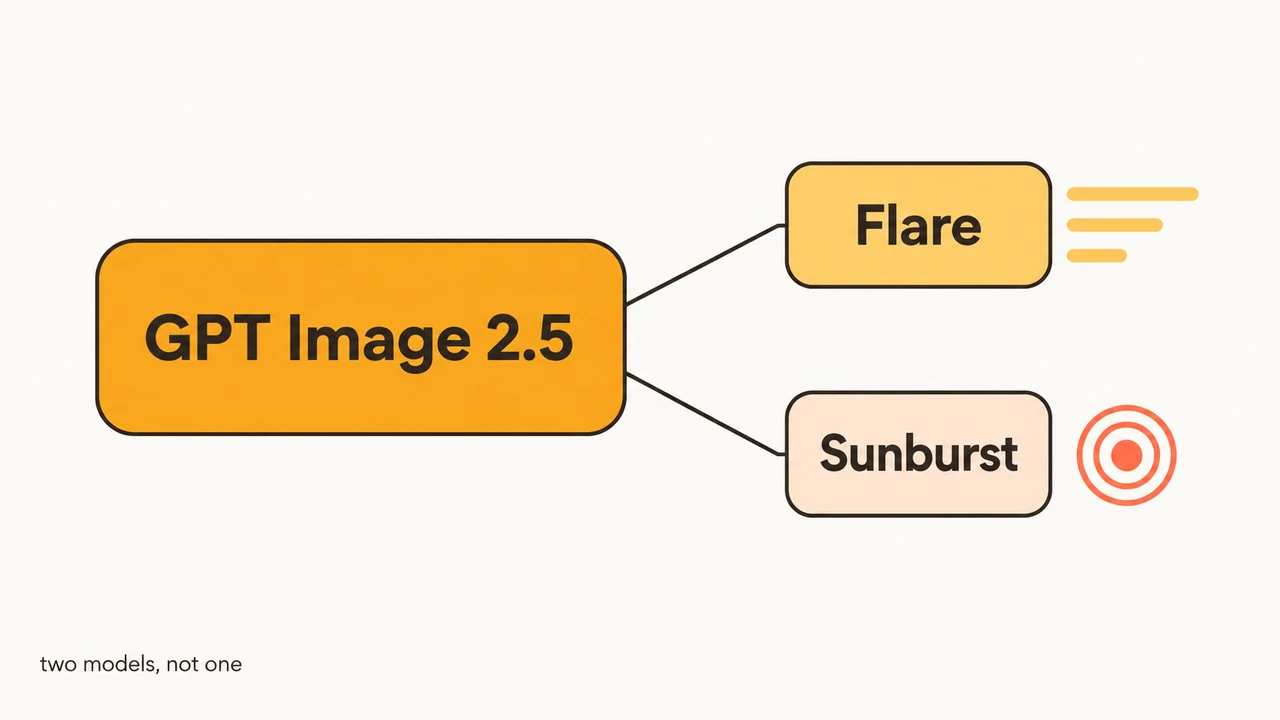
There is no gpt-image-2.5 model identifier in the API. In GPT Image 2.5, "2.5" is a family label covering two separately addressable models:
gpt-image-2.5-flare— described on its model page as "fast, high-quality everyday image generation"gpt-image-2.5-sunburst— which generates and edits "from text and image inputs. Use it for workflows where editing precision matters most"
Both default to a dated -2026-09-08 snapshot, so the alias and the pinned version are the same thing today. They will diverge the moment OpenAI ships a revision — pin the snapshot now if reproducibility matters to you.
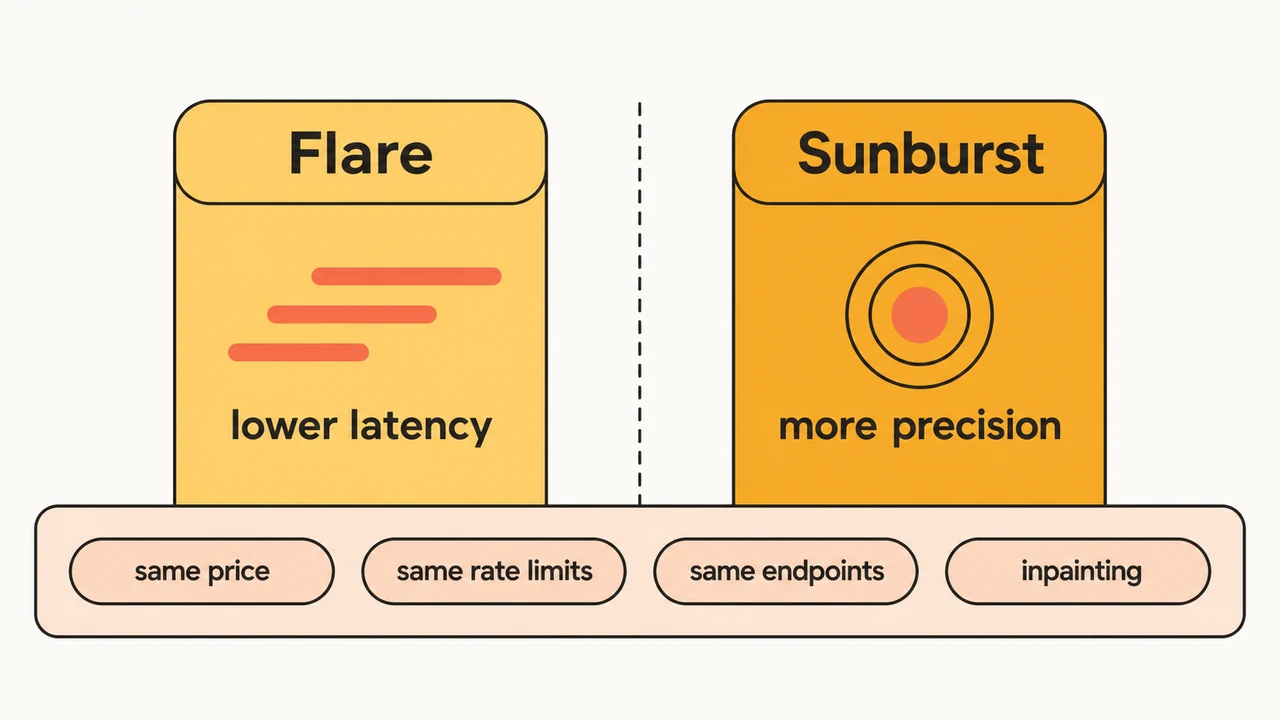
OpenAI's own one-line split: "Flare brings the same quality, editing, and speed improvements, while Sunburst adds precision for detailed creative work, with longer generation times."
What is actually different between GPT Image 2.5 Flare and Sunburst
Almost nothing structural. This surprised us.
Both expose the same two endpoints — v1/images/generations and v1/images/edits. Both support inpainting. Both take text and image inputs and return images. Both carry identical rate limits at every tier, from 100,000 TPM and 5 images per minute at Tier 1 up to 8,000,000 TPM and 250 images per minute at Tier 5. And both are priced identically, down to every cached-token rate.
Across GPT Image 2.5, the difference is latency versus precision, and that is genuinely the whole decision. There is no premium tier here, no gated capability, no separate quota to negotiate.
How to choose a GPT Image 2.5 model
Because the two GPT Image 2.5 models are interchangeable at the API surface, you can route between them per request rather than committing at design time:
- Reach for Flare when iteration rate is the constraint — exploration, variant sweeps, drafts, anything where a human is waiting on the result.
- Reach for Sunburst when a specific image has to survive several rounds of editing without drifting, or when it is going out the door as a finished asset.
The GPT Image 2.5 pattern we settled on is to draft on Flare, then re-run the one composition that survived on Sunburst. Since both models cost the same per token, this costs you nothing but the extra run — which is a genuinely unusual property, and the reason the Flare/Sunburst split is easier to adopt than a typical fast/premium tiering.
GPT Image 2.5 API pricing, and the number that isn't there
OpenAI's pricing page lists both GPT Image 2.5 models at identical rates:
| Token type | Price per 1M tokens |
|---|---|
| Text input | $5.00 |
| Cached text input | $1.25 |
| Image input | $8.00 |
| Cached image input | $2.00 |
| Image output | $30.00 |
The headline here is what these rates are equal to. They match gpt-image-2 exactly, in every row. GPT Image 2.5 is a quality and latency upgrade at unchanged token prices — you do not trade budget for the improvement, which is not how model upgrades usually go.
Why you cannot compute GPT Image 2.5 cost per image from this table
Now the catch, and it is a real one. Image output is billed per token, but OpenAI does not publish how many output tokens an image of a given size consumes. Worse, both model pages carry the same explicit warning: the GPT Image 2 calculator does not estimate GPT Image 2.5 token consumption.
So the tooling that would answer "what does a 1024×1024 image cost?" is documented as not applying to this model, and no replacement table shipped with it. Any per-image dollar figure you see quoted for GPT Image 2.5 right now is someone's extrapolation, not a published rate.
The only reliable move is to read usage off your own GPT Image 2.5 API responses at each size and quality setting you intend to ship, and build your cost model from measured tokens. We log token counts per generation for exactly this reason.
The GPT Image 2.5 pricing lever worth knowing about
One rate on that table is worth designing around: cached image input drops from $8.00 to $2.00 per million tokens, a 4× reduction.
That applies to the reference image, not the output. In an edit-heavy workflow the reference is resent on every call, so whether your requests hit the cache is a meaningful share of the bill.
Here is the GPT Image 2.5 arithmetic, and notice it works without knowing the token count. Take one product shot revised fifteen times. Cached image input costs a quarter of uncached, so measure the reference in units of one uncached send:
- Cache never hits: 15 sends × 1.0 = 15 units
- Cache hits after the first: 1.0 + (14 × 0.25) = 4.5 units
That is 4.5 against 15 — the reference-image line of the bill drops to 30% of the uncached case, a 70% saving, on identical output. Because the ratio is fixed by the published rates, it holds whatever a reference image turns out to tokenize as.
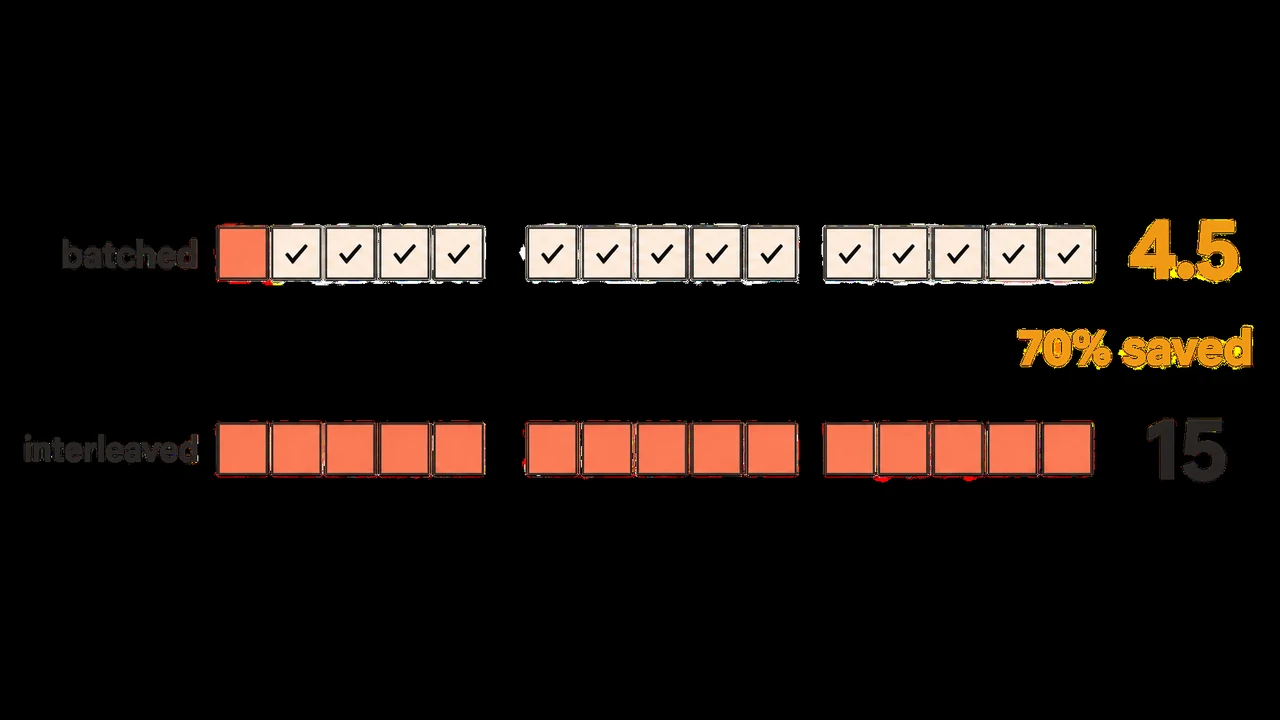
The practical consequence: batch all revisions of one image together rather than interleaving them across different source images. Round-robin through fifteen products one edit at a time and every call is a cache miss — same GPT Image 2.5 output, roughly triple the input cost.
The GPT Image 2.5 resolution ceiling nobody quotes correctly
GPT Image 2.5 is widely described as "up to 4K." That is loose enough to mislead, and the image generation guide is precise where the summaries aren't.
The real GPT Image 2.5 constraints on any custom size:
- Width and height must each be a multiple of 16
- Aspect ratio must fall between 1:3 and 3:1
- Neither edge may exceed 3,840 pixels
- Total pixel count must land between 655,360 and 8,294,400
Recommended GPT Image 2.5 presets are 1024×1024, 1536×1024, and 1024×1536.
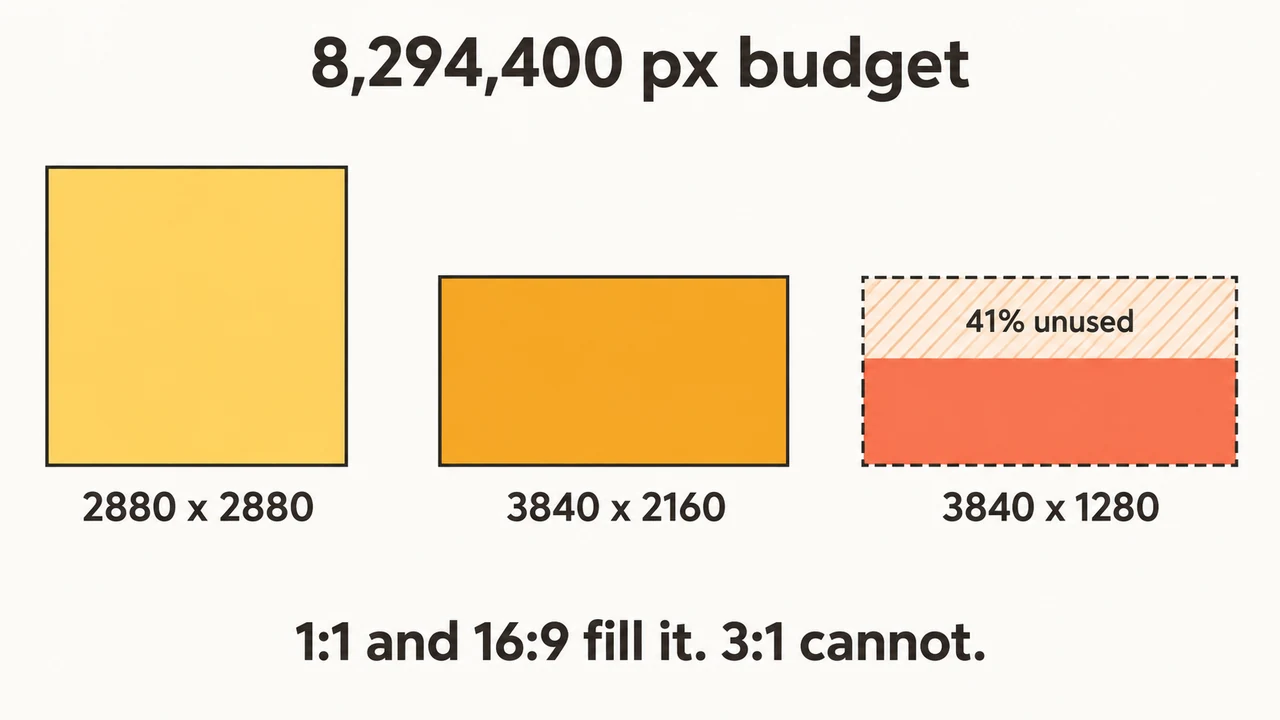
That total-pixel ceiling is the binding one, and it resolves to something specific: 8,294,400 pixels is exactly 3840 × 2160. So "4K" here means UHD at 16:9, and only at 16:9 — it is the single widest-and-tallest combination the ceiling permits, not a resolution class you can request in any shape.
Work the arithmetic for a square and the ceiling bites: the largest square GPT Image 2.5 will produce is 2880 × 2880, because 2880² is precisely 8,294,400. Ask for 4096 × 4096 and you are requesting 16.7 million pixels — twice the ceiling, and past the per-edge limit as well.
If you are generating square assets and assumed "4K" meant 4096 on a side, that is the gap to plan around.
Largest valid GPT Image 2.5 size by shape
Solving all four GPT Image 2.5 constraints at once — exact aspect ratio, both edges multiples of 16, neither over 3,840, total under 8,294,400 — gives the real ceiling per shape:
| Aspect ratio | Largest valid size | Total pixels |
|---|---|---|
| 1:1 | 2880 × 2880 | 8,294,400 |
| 16:9 | 3840 × 2160 | 8,294,400 |
| 9:16 | 2160 × 3840 | 8,294,400 |
| 3:2 | 3504 × 2336 | 8,185,344 |
| 4:3 | 3264 × 2448 | 7,990,272 |
| 3:1 | 3840 × 1280 | 4,915,200 |
Three shapes reach the ceiling exactly — 1:1, 16:9 and 9:16 — because 2880, 3840 and 2160 all happen to be multiples of 16. The intermediate ratios don't: 3:2 and 4:3 get quantised down by the multiple-of-16 rule and land short of the budget. And 3:1 is capped by the per-edge limit instead, leaving 41% of the pixel budget unused — so the widest format GPT Image 2.5 accepts is also the one that wastes the most available resolution.
If you need maximum pixels, generate at 1:1, 16:9 or 9:16 and crop. Requesting an unusual ratio silently costs you resolution.
GPT Image 2.5 vs GPT Image 2
| GPT Image 2 | GPT Image 2.5 | |
|---|---|---|
| API models | one (gpt-image-2) | two (Flare, Sunburst) |
| Latency | baseline | up to 50% lower vs Images 2.0 |
| Editing | supported | more precise, more consistent across repeated edits |
| Token pricing | $30/1M image output | identical |
| Rate limits | tier-based | tier-based, same ceilings |
The short version on GPT Image 2.5: better editing, higher peak quality on Sunburst, materially lower latency on Flare, at the same price. The upgrade path to GPT Image 2.5 is a model-string change.
The one thing I would not assume is text rendering. GPT Image 2.5's improvements to fine detail and multi-edit consistency plausibly help with lettering on signage and UI mockups, but OpenAI published no text-specific benchmark, and "sharper details" is not a legibility guarantee. If your use case is text-in-image, benchmark it yourself before you migrate.
What OpenAI did not say about GPT Image 2.5
Worth being explicit about the GPT Image 2.5 gaps, because several of them affect production decisions.
Only preliminary independent benchmarks. At launch GPT Image 2.5 had no public arena scores. Since then both models have entered Arena's text-to-image leaderboard at the top — Sunburst at 1421, Flare at 1399, ahead of gpt-image-2 at 1381 — and did the same on the image-edit board. Both are flagged preliminary on around 3,000 votes each, against nearly 79,000 for GPT Image 2, so treat the ordering as early signal rather than settled. No third party has reproduced the latency figures; the "up to 50%" number is still OpenAI's own measurement.
No GPT Image 2.5 Flare-versus-Sunburst numbers. Sunburst has "longer generation times." How much longer is unpublished, so the latency cost of routing to it is something you have to measure against your own prompts.
No token-per-image table, as covered above.
No statement about content provenance. OpenAI's launch blog, API changelog, and release notes do not mention C2PA content credentials or provenance metadata for GPT Image 2.5 outputs. There is no denial either — the subject simply doesn't appear. If your compliance posture depends on embedded provenance, verify it against actual output files rather than assuming it.
GPT Image 2.5 FAQ
Is there a single gpt-image-2.5 model?
No. GPT Image 2.5 is a family name, and the API exposes two models: gpt-image-2.5-flare and gpt-image-2.5-sunburst. A request naming gpt-image-2.5 alone has no model to resolve to — pick one of the two.
Does GPT Image 2.5 cost more than GPT Image 2?
No. Both GPT Image 2.5 models bill at the same token rates as gpt-image-2 — $5.00 per million text input tokens, $8.00 image input, $30.00 image output — so the upgrade carries no price premium. What you cannot do is convert those rates into a per-image price, because OpenAI publishes no token count per image.
What is the maximum GPT Image 2.5 resolution?
Neither edge may exceed 3,840 pixels and the total must stay under 8,294,400 pixels. That allows 3840×2160 at 16:9, and caps a square GPT Image 2.5 output at 2880×2880.
Should I use GPT Image 2.5 Flare or Sunburst?
Flare for speed and volume, Sunburst when an image must hold together through repeated edits. Since pricing, rate limits, and endpoints are identical, the decision is reversible per request — there is no lock-in either way.
Is GPT Image 2.5 better at rendering text in images?
Probably, but it is unproven. GPT Image 2.5 improved fine detail and multi-edit consistency, which tends to help lettering, but OpenAI published no text-rendering benchmark. Test your own text-heavy prompts before relying on it.
Is GPT Image 2.5 free to use?
In ChatGPT, yes — the rollout covered all tiers including free. Through the API it is paid per token, and on Flowlio AI each generation costs credits, with current credit pricing shown before you run.
Trying GPT Image 2.5
GPT Image 2.5 is a well-judged release. It is faster where speed compounds, more precise where precision is billable, and it did not raise prices to do either — and the Flare/Sunburst split, once you see that the two models are identical everywhere except latency and precision, is easier to build on than the usual premium tier.
You can try Flare in our GPT Image 2.5 AI image generator, with the credit cost shown before each run. If you are editing an existing frame rather than generating from scratch, image to image is the same model behind a reference upload. Draft on the fast path, find the composition that works, then spend the precision on the one that survived.
Written by Adrian Cole, founder of Flowlio AI, from firsthand integration work against the GPT Image 2.5 API. Specifications reflect OpenAI's published documentation as of September 9, 2026 and may change.